Follow the instructions below to get started.
STEP #1
SET UP YOUR FREE DSJEX ACCOUNT
In less tha 5 minutes, you'll be ready for the next step.
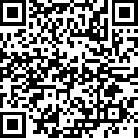
Visit https://Join.BuildYourWealthInitiative.com or Scan the QR Code Below
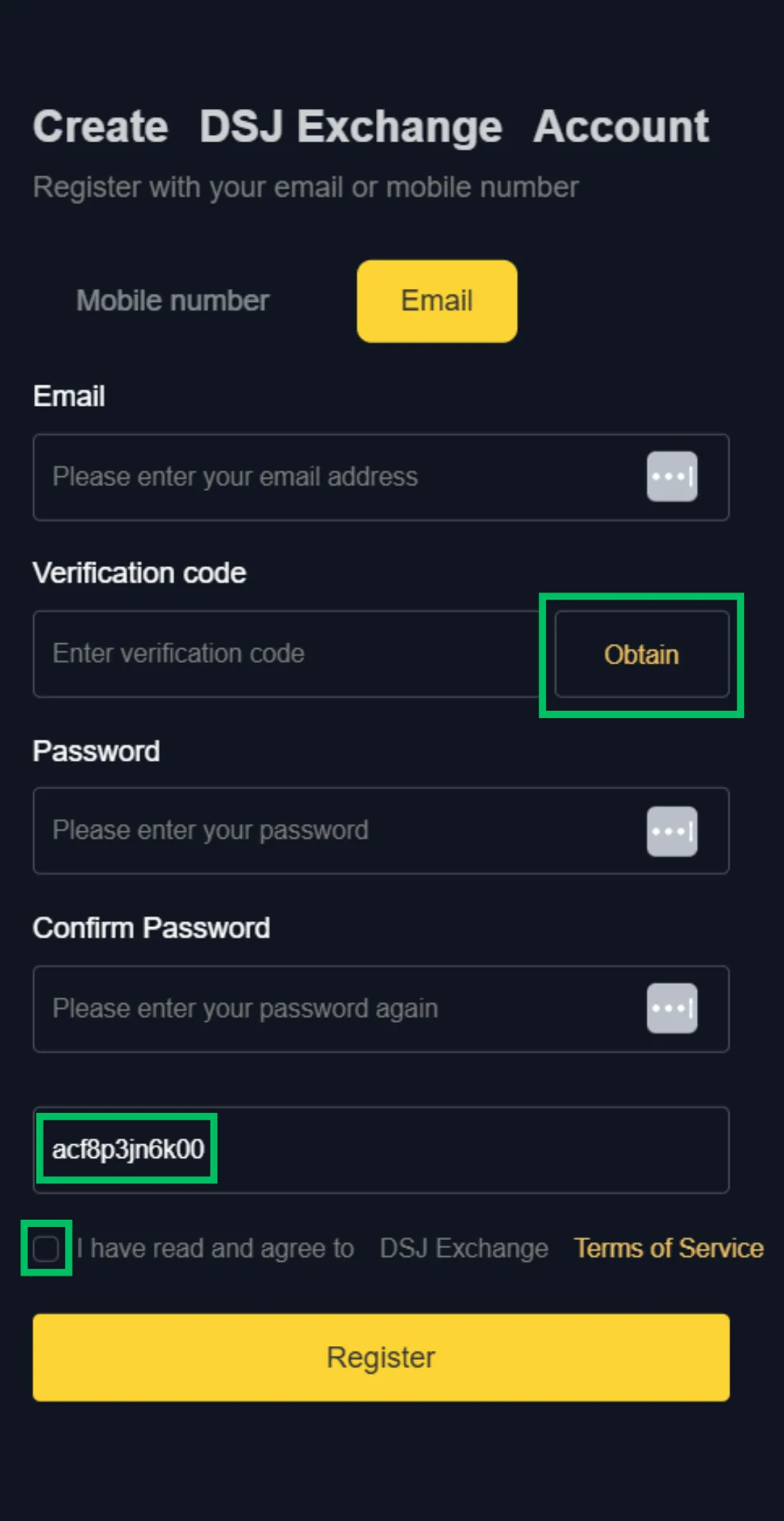
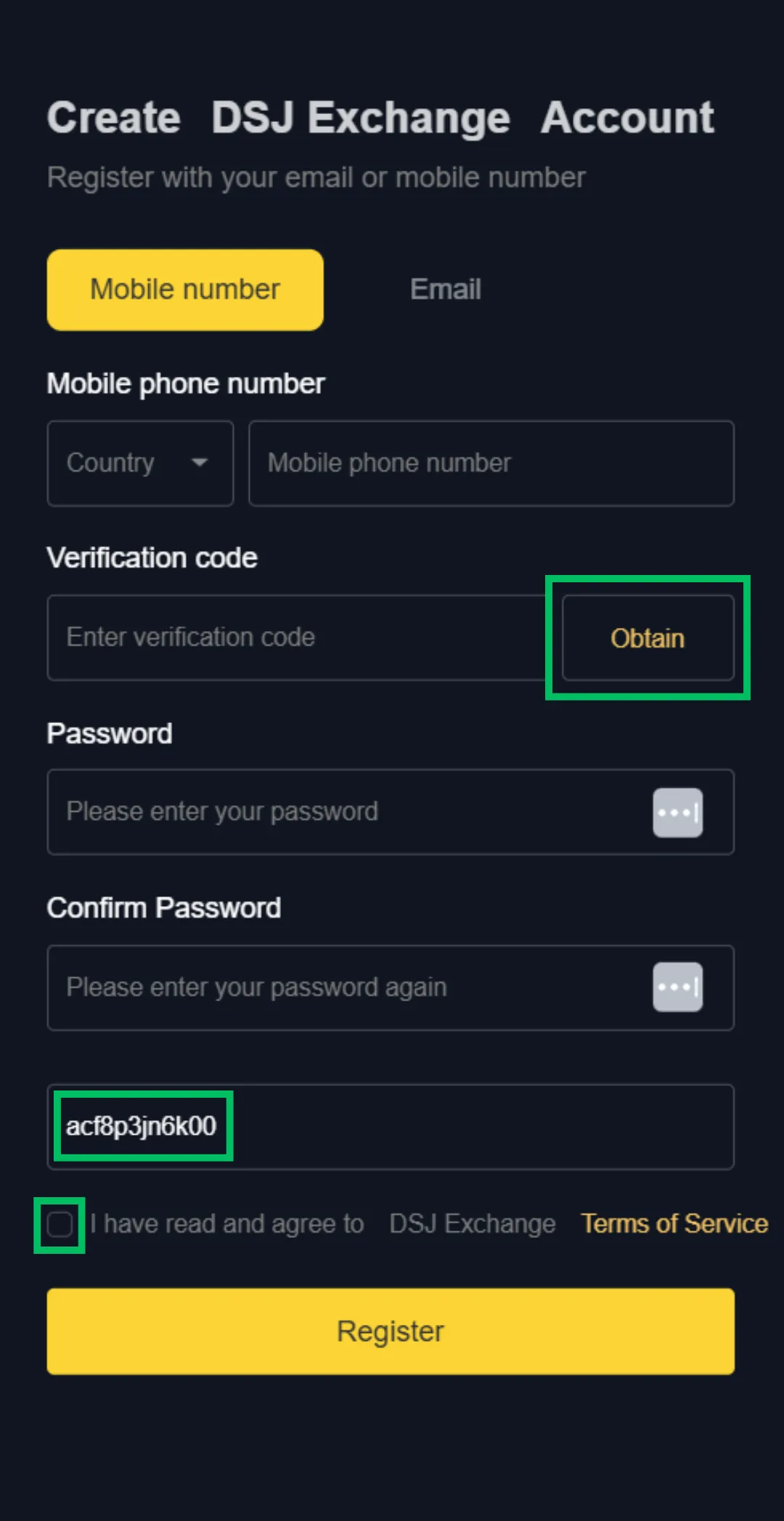
Choose Your Login Method - Select "Email" OR "Mobile Number"
Enter Your Mobile Number OR Email Based on Your Selection
Click "Obtain" to Receive Your Verification Code (sent to your mobile phone or email)
Enter Your Verification Code
Choose Your Password
Confirm Your Password
Invite Code Should Read: ACF8P3JN6K00 - DO NOT CHANGE
Click the "Register" Button
Invitation QR Code


STEP #2
Locate your DSJEX ACCOUNT
crypto deposit address
DSJEX accepts the following Cryptocurrencies: BTC, ETH, USDT, and USDC
Log in to your DSJ exchange account and select "Assets"
Select Deposit
Select the Currency Type You Purchased on Your Crypto Platform (BTC, ETH, USDT, or USDC)
Choose the Appropriate Chain Name
Click Copy for the deposit address (the yellow bar)


Chain Name: Use "ERC20" if you chose USDT/USDC

Chain Name: Use the 2nd "BTC" if you chose BTC

Chain Name: Use the default "ETH" if you chose ETH
STEP #3
FUND YOUR DSJEX ACCOUNT USING YOUR CRYPTO WALLET
($500 MIN - $10K Max TEAM Deposit)
Popular Crypto Exchange Platforms: Coinbase, Kraken, Binance, and Gemini. The instructions below may vary slightly depending on your chosen platform.
Log in to your Cryptocurrency account
Purchase your BTC, ETH, or USDT on the secure platform.
Select "Transfer" (Be advised that your platform may charge a transfer fee)
Paste your DSJ deposit address (verify that you've copied the correct info)
Select the network
Enter the amount you would like to send ($500 minimum - $10,000 maximum)
Select "Preview" to confirm instructions are correct
Select "Send Now" to complete the transaction
Take a screenshot of the completed transaction (REQUIRED for BTC deposits)
BTC DEPOSITS ONLY (Skip this step if depositing USDT or ETH): Log in to your DSJEX account -> Assets -> Deposit -> Choose BTC as currency -> Choose the 2nd BTC box as your Block Chain -> Enter your deposit amount, including ALL OF THE DECIMALS shown on your screenshot (ex. 0.00234) -> Click "Next" -> Upload your screenshot -> Click "Confirm".
Wait 8-10 minutes for the deposit to appear in your DSJEX account.
If there is a delay, click "Contact Us" in your DSJ account and request verification that the deposit was received. DSJ is not responsible for misdirected deposits. Be sure to confirm that you are sending your deposit to the DSJEX deposit address provided in your account.
STEP #4
prepare your account for trading
Funds MUST be in the DSJ Exchange "Trade" account to be eligible for trading activity.
Log in to your DSJ account
Click "Assets"
Recently transferred funds will be displayed in your "Exchange" account. Click the arrow next to your funds.
Confirm your funds are available as "USDT". The system should have automatically converted them for you.
Click "Transfer"
Confirm the Fund Transfer is listed as follows: "From: Exchange" and "Transfer to: Trade"
Select currency: USDT
Enter the amount you'd like to transfer or simply click "ALL"
Click "Confirm"
Click "Done/OK" to complete the transfer.
STEP #5
VERIFY YOUR ACCOUNT TO RECEIVE TRADE SIGNALS
Here's how to find your account ID and request verification:
Download the BonChat app (BonChat is a secure, end-to-end encrypted messaging and collaboration app for iOS and Android available in the Google Play Store and the Apple App Store
Join our secure BonChat server - Enter: d333666 server ID & click
"Join"
Scroll to the bottom to find "Sign-Up"
Enter your phone # To Get SMS Code (Select Send)
Enter Code you receive & Select Continue
Enter Nickname and create a Password
Once you're logged in, use the search bar to "Send Friend Request" to Elena at "Elena03"
Click on her name and click "Chat"
In the chat box, type "Hi Elena" and hit send.
Await further instructions from Elena via chat. Have your Account ID ready when she responds.
Find your account ID
Log in to your DSJ account
Click the Account User icon at the top left of the screen.
Copy the "ID" information (you can click the copy icon next to your ID)
STEP #6
team check-in
Complete this form to officially join the Build Your Wealth Initiative
Here's how to find your Account ID:
Log in to your DSJ account
Click the Account User icon (the little person at the top left of the screen)
Copy the "ID" information (you can click the copy icon next to your ID)
You can also grow your income by referring others and earning commissions, bonuses, and dividends. The incentive rewards program is 100% optional.

Copyright 2025. All Rights Reserved.